Taskade Lifetime Software Deal Grabltd expired

Taskade

The Unified Workspace For Remote Teams

Lifetime Deals
No review yet. be the first

Taskade is the unified workspace with real-time collaboration for your tasks, notes, and projects. Create a team to-do list, mind map, kanban boards, charts and more.

$245
$3050
Browse Deals

Remote Teams all over the world face the difficulty of communicating, scheduling their tasks or managing their projects. It is where Taskade comes in hand. It is an all in one collaboration tool to supercharge your team’s productivity with collaborative task lists, notes, and mind maps.

Not just that, you can also:

  • Upgrade the team productivity for managing multiple tasks and projects
  • Ability to break large tasks into smaller pieces with unlimited hierarchy (cascading tasks) 
  • An easy and simple way to manage client projects across multiple teams. (subspaces)
  • An easy way to automate tasks and projects with “Custom Templates” shared in each workspace or subspace.

Taskade – It is a unified workspace with real-time collaboration for your tasks, notes, and projects. Create a team to-do list, mind map, kanban boards, charts and more.

Taskade is where remote teams chat, organize, and get things done. Supercharge your team productivity with collaborative task lists, notes, and mind maps, in one unified workspace. Taskade is simple, beautiful, and fun.

Collaborate Instantly – Taskade is built for real-time collaboration. Share your projects, chat with teammates, and see changes as they happen, across all devices on mobile and desktop.

Organize Visually – Taskade is a collaborative task list with unlimited hierarchy, designed to help remote teams work together in one unified workspace.
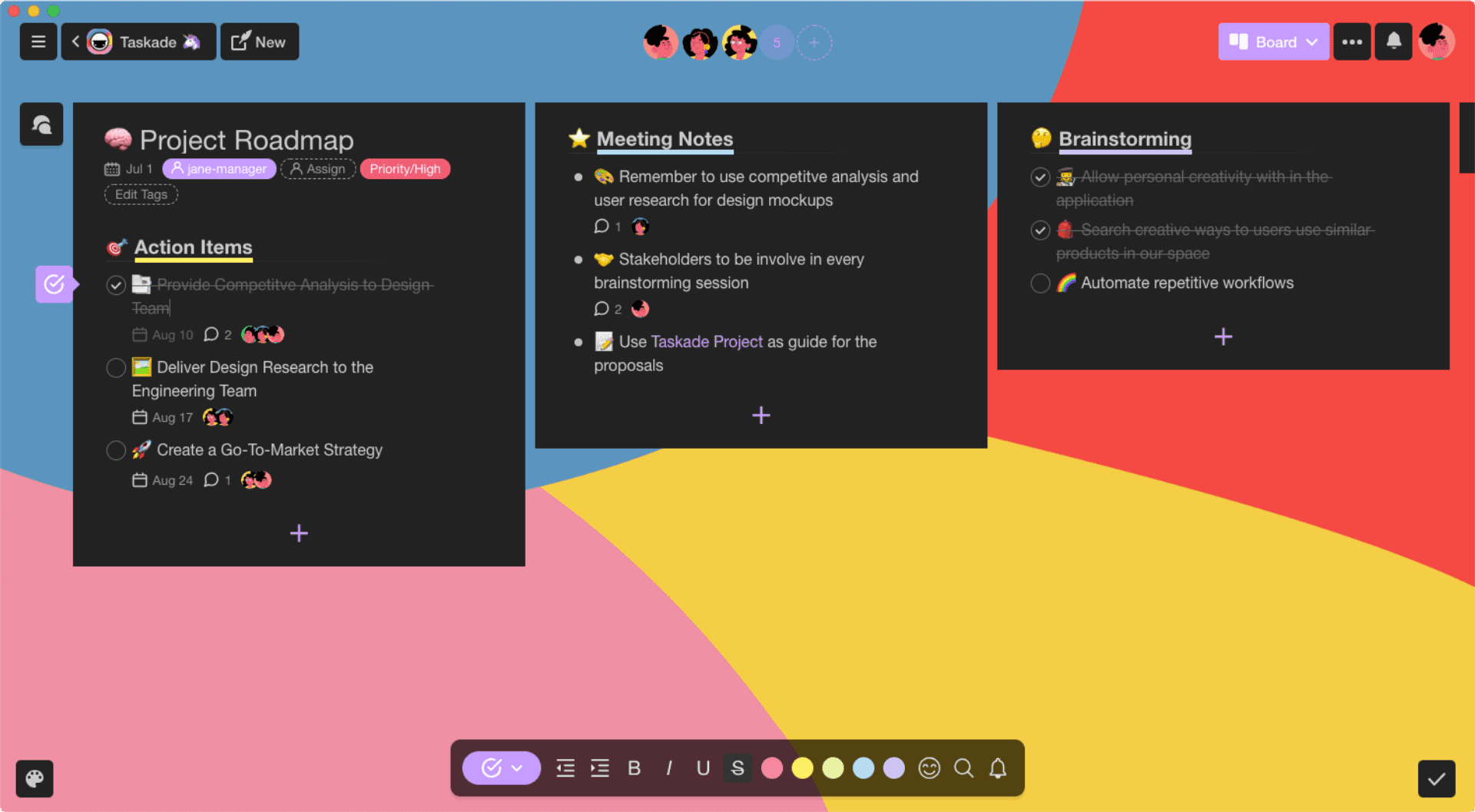
Taskade | A Unified Workspace For Remote Teams 2

Manage Anything – Plan, organize, and prioritize upcoming tasks in the team roadmap. Taskade lets you automate your workflows and get work done.

Plan Collaboratively – See your team progress in a shared calendar. Taskade helps you quickly plan out multiple projects across teams and workspaces.

Templates – Select the template that best fits your need:

  • Weekly Planner
  • Bullet Journal
  • Personal Tracker
  • Teamwork List
  • Project Board
  • Prioritization Board
  • Strategy Checklist
  • Mindmap
  • Development Tree
  • Organizational Chart
  • Team Management
  • Meeting
  • music
  • Research
  • Growth
  • Journaling
  • Gaming
  • Education
  • Travel
  • and more…

Web Browser Extension & App – Get started with Taskade’s browser extensions, available for Chrome and Firefox. You can also use Taskade via iOS App, Android App, Windows App, Mac App, Linux App.

Taskade helps teams stay competitive in the modern workplace by cutting down the unnecessary friction in planning, organizing, and decision making. There is no maze of functionality or context switching between multiple tools, so you and your team can focus on getting work done from day one.

What’s the Benefit of using Taskade?

  • Projects can be visualized in multiple ways, from task list > kanban board > mind mapping, the data is persistent, you can mix and match, and work with your team, depending on the project, to edit and present in different VIEWS of Taskade 
  • Taskade is one unified workspace for 3Cs, coordination, collaboration, and communication. It also has a real-time engine similar to Google Docs so you can work on the same page/project across multiple devices, in real-time.
  • Taskade offers tasks, notes, and video chat, all on the same page.
  • Get Familiar with Smart Formatting like creating blocks, drag n drop, adding notes/tags and more.
  • Pick up the pace with Bulk Actions / Multi-Select Tasks + Blocks
  • and so much more..

Alternate For – Todoist, Trello, ClickUp, Notion

Get a lifetime deal to Taskade now!

Plans & Pricing

Plan A (Unlimited)
$245
$3050
Save $2805 (92%)
  • Unlimited Users
  • Unlimited Features
  • Unlimited Tasks & Projects
  • Unlimited Members & Guests
  • Unlimited Subspaces & Teams
  • Templates, Calendar, Repeat Tasks
  • Real-time Collaboration
  • Version History
  • Advanced Permission
  • Cloud Upload Integration
  • 2-Way Calendar Integration
  • All Future Updates Included
  • Early-Bird Discount Inclusive
  • 60 Days Refund Policy
Deal Expired!

Reviews

0.0
0.0 out of 5 stars (based on 0 reviews)
Excellent0%
Very good0%
Average0%
Poor0%
Terrible0%

There are no reviews yet. Be the first one to write one.

Frequently Asked Questions

What is Taskade?

Taskade is where remote teams get work done. Organize tasks, write product specs, automate repetitive workflows, and video chat with your team, all in one unified workspace.

How do I use Taskade?

Create a project to capture your ideas, team goals, and weekly tasks. To collaborate with your team, simply share your project, or invite team members into a workspace.

In what ways can I use Taskade to be more productive?

You can use Taskade for weekly agendas, team meetings, project outlines, product roadmaps, and much more. For inspiration, please visit our templates gallery and try out over 300 free templates.

Can I collaborate with others?

Yes! Use Taskade as your unified team workspace to organize ideas, manage tasks, and get work done. Start by creating a workspace and adding your team members. From there, you can work together, assign tasks to team members, and chat live alongside your projects.

Is there a limit to the number of video chat participants? Workspace members?

There is no limit. Taskade offers unlimited project collaborators and workspace members for free.

What is a workspace?

A workspace is a collection of projects. By inviting others to join the workspace, you can collaborate on multiple projects, all in real-time. You can also create subspaces for different teams and departments.

How do I invite someone to join my workspace?

Go to your workspace and click on the ‘Invite’ button at the top. You can invite others by sending them a share link. Members will by default have full access to the workspace. You can learn more about permissions.

All 10 Workspaces will include everything from the plan?

10 workspaces include unlimited upgrades for all team members and all other features from the mentioned plan, which makes deal extremely generous.

Can I share an individual project?

Yes, you can share individual projects. To share multiple projects in the same workspace, you can simply invite them to your workspace. External projects shared with you will appear in the Recent tab.

How do I assign a task to someone else?

Simply click on the assign icon above each task. You can also tag members by typing @ followed by their username (e.g., @john). You can assign members to the entire project by clicking on ‘Assign’ near the title.

Can I set deadlines and due dates for tasks?

Yes, you can set due dates for any task. Click on the calendar icon to select a due date.

Who can see my projects?

Your projects are hidden and invisible to others by default. You can share a project or create a workspace to collaborate with your team. If you need more privacy, simply create a new workspace for yourself.