


FeaturedSales & CRM · Lifetime deal
OptimusDesk
Your customers, quotes, appointments and daily work—connected in one workspace.
$39one-time (Lifetime Core — Tier 1)
Sold by OptimusDesk
GrabLTD Software marketplace
GrabLTD lists lifetime deals and subscriptions for software, with video reviews and prices side by side. Add what you already pay for to a free workspace and see renewals and overlap before you buy.
580+ live deals on . Prices in USD, excluding tax.
01 Spotlight
Your customers, quotes, appointments and daily work—connected in one workspace.
Sold by OptimusDesk
02 Lifetime deals
The deals buyers clicked most in the last 30 days. Prices checked .

Productivity
Muro Analytics sends yesterday's website numbers to your inbox at 8 AM as a two-minute read. It tracks visits and signups without cookies, so no consent banner, and its short links show which post, sponsor or channel brought people in.

Design
Collect client files, copy and approvals through one no login request page.
Productivity
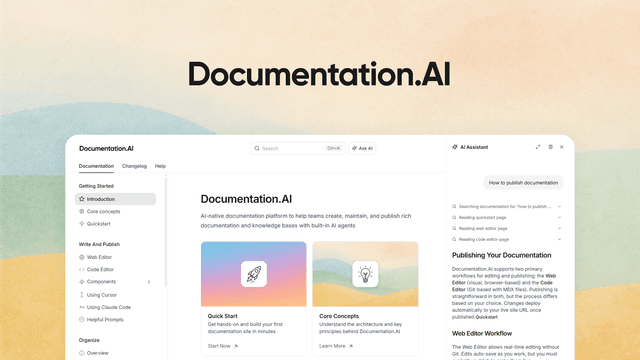
Your docs now have two audiences: the person reading the page and the AI model answering questions about your product. Documentation.AI publishes one set of pages for both, with a cited assistant on the page, an auto-built llms.txt and an MCP server for the models.

AI Tools
Your long videos already hold the shorts, captions and thumbnails you keep meaning to make. Taja cuts them out, writes the search metadata, and queues everything for YouTube, Instagram, TikTok, Facebook, LinkedIn and X from one upload, so the repurposing actually happens every week.

Productivity
Link shortener with projects, 90-day click stats, pixels, UTM tags and deep linking.
Productivity
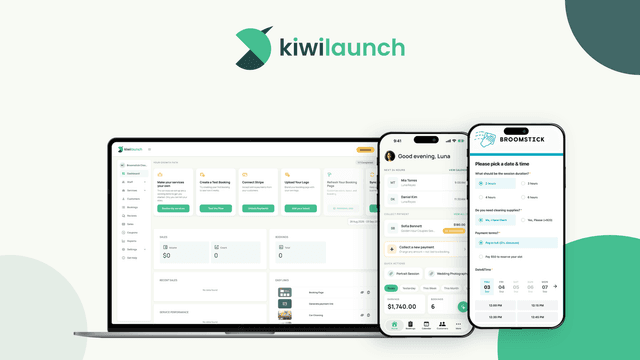
Clients pick a class or session, see real availability and pay on your own website, and you run the day from an iPhone that doubles as the card reader. Kiwilaunch is booking software for people who sell their time, not their calendar link.
03 Ways to pay
Not every tool should be a lifetime deal. We list subscriptions too, and review tools on video before you commit to either.
Pay once. Some are sold on GrabLTD with a refund window; most come from partner marketplaces such as AppSumo, DealMirror and Dealify.
Browse lifetime dealsMonthly and annual software listed next to lifetime deals, so you can compare like for like.
Open subscriptionsEvery live AI deal in one list, with the seller and price on each.
See AI tools04 Categories
Live deals per category,
05 Your workspace
Add the tools you use, whether you bought them here or not. The workspace keeps the costs, codes and dates, and tells you when something renews or doubles up.
Every app you use, owned or on subscription, with what it costs per month and per year.
Keep every order and license code in one place, with the refund date next to it.
Add a renewal date once. We remind you before it charges, so you can decide in time.
See where two tools do the same job, and which one you could drop.
Save deals for later and keep a list for each project or team.
Queue video reviews and come back to them before you decide.
Previews use example data.
06 Switching guides
Each guide walks through the move and states the plans it compares.
| Switch | Time | Difficulty | Saves in year 1 |
|---|---|---|---|
| Calendly to TidyCal | 30–60 minutes | Easy | $115 |
| Zapier to Pabbly Connect | 2–4 hours | Easy | $239 |
| Mailchimp to FluentCRM | 1–2 days | Hard | $111 |
| ConvertKit to SendFox | 3–5 hours | Medium | $299 |
| Dropbox Plus to pCloud Lifetime | 3–6 hours | Medium | $45 |
| Bitly to ShortyBuild | 1-2 hours | Easy | $339 |
Year-one savings use the monthly price each guide states.
07 Blog
GrabLTD is back with a rebuilt site, plans compared side by side, a free workspace for the software you pay for, switching guides and deal alerts by email.

Five concrete service businesses you can run on a one-time €200 lifetime-tool stack, with the tools and realistic 12-month revenue for each.

AI lifetime deals are the most volatile category on any marketplace. Here is how to tell a genuinely useful buy from a sticker price the vendor can’t keep.
08 Stay and join
One short email a week with the deals worth your money. Unsubscribe any time.
List a lifetime deal or a subscription. You keep 65% of each direct sale.
See how listing worksGet 20% of the sale price on deals sold directly on GrabLTD. Anyone can join.
Join the affiliate programme09 FAQ
How the site works, how it earns, and who handles refunds.
Yes. Browsing, search, switching guides and the workspace are free. There is no paid tier for buyers.
Four ways: an affiliate commission when you buy a curated deal from a partner marketplace, a share of each deal sold directly on GrabLTD, a monthly listing fee from subscription software vendors, and paid placements in the featured spots on the homepage. None of these change your price, and paying for a placement never buys a recommendation.
No. The price is the same as buying directly from the seller.
For deals sold on GrabLTD, you request the refund from GrabLTD inside the deal's refund window (14, 30 or 60 days, shown on the deal). For deals sold elsewhere, the seller's own refund policy applies; we show it on the product page.
A free, private list of the software you pay for: lifetime tools, subscriptions with their renewal dates, your purchases and license codes, and where two tools do the same job.
The usage limits (tasks, seats, credits), whether support is included, whether you can upgrade later, and the refund window. Every product page lists these near the price.